Getting started with R

Session 3 of 4: Data visualisation

Freddie Heather

Recap from session 2

Recap questions

  • What is a script?
  • Name five data manipulation functions from last week.
  • What is the ‘pipe’ operator?
  • What does “>=”, and “!=” do, and how would you use them?
  • I want to create a new column in a tibble. What function would I use?
  • I filter my data (e.g., age >= 3), name three way to check if the filter has worked?
  • What is the ‘tidyverse’?

Today: Session 3

  • Data import, checking, wrangling (recap)
  • Data visualisation
  • Critical thinking approach

Task

  1. Start a new R project, or open the project from last week.
  2. Create a new script and call it something informative (e.g., session3 or data_vis).
  3. Comment your name, date, and a title at the top of the script.
  4. Save your script!

Data import & checking

Data import

Task

  1. Download the Reef Life Survey file ‘cape_howe.csv’ from: https://github.com/FreddieJH/r_workshop
  2. Import the csv and save it in R as an object (this will be your raw object and never overwritten)
  3. Create a new object that is only a single site - Choose one other than JBMP-S2
library(tidyverse)

capehowe <-
  read_csv("cape_howe.csv")

jervis <-
  capehowe %>%
  filter(site_code == "JBMP-S2")

Data import

  • Has it imported correctly?
  • Sometimes you might have your hypothesis before data collection, not always

Task

  1. Use head() and at least one other function to check to see things look okay.
  2. How many columns? What do the columns mean?
  3. Think of a question(s) that you could answer using these data.

Data visualisation

Two numerical variables

  • Hypothesis 1: I think that bigger fish are less abundant.
  • What columns would I need to consider?
  • How might I visualise this? boxplot? scatterplot? barplot?

A bit of wrangling first

  • To answer the question if ‘bigger’ fish are more abundant, we are interested in the species, their mean size, and their total abundance.
# getting the mean size and abundance of each species in jervis bay
sizes_byspp <-
  jervis %>%
  summarise(
    mean_size = weighted.mean(x = size_class, w = n_500m2),
    total_abundance = sum(n_500m2),
    .by = species_name
  )

Choosing the type of plot

Predictor variable (x) Response variable (y)
Barplot, Boxplot, Violinplot Categorical Numeric
Scatterplot Numeric Numeric
Density, Histogram Numeric -

Scatterplot using ggplot()

  • ggplot() is a function from the ggplot2 package (it’s part of the tidyverse collection of packages)
  • Scatterplot is used to compare two numerical variables

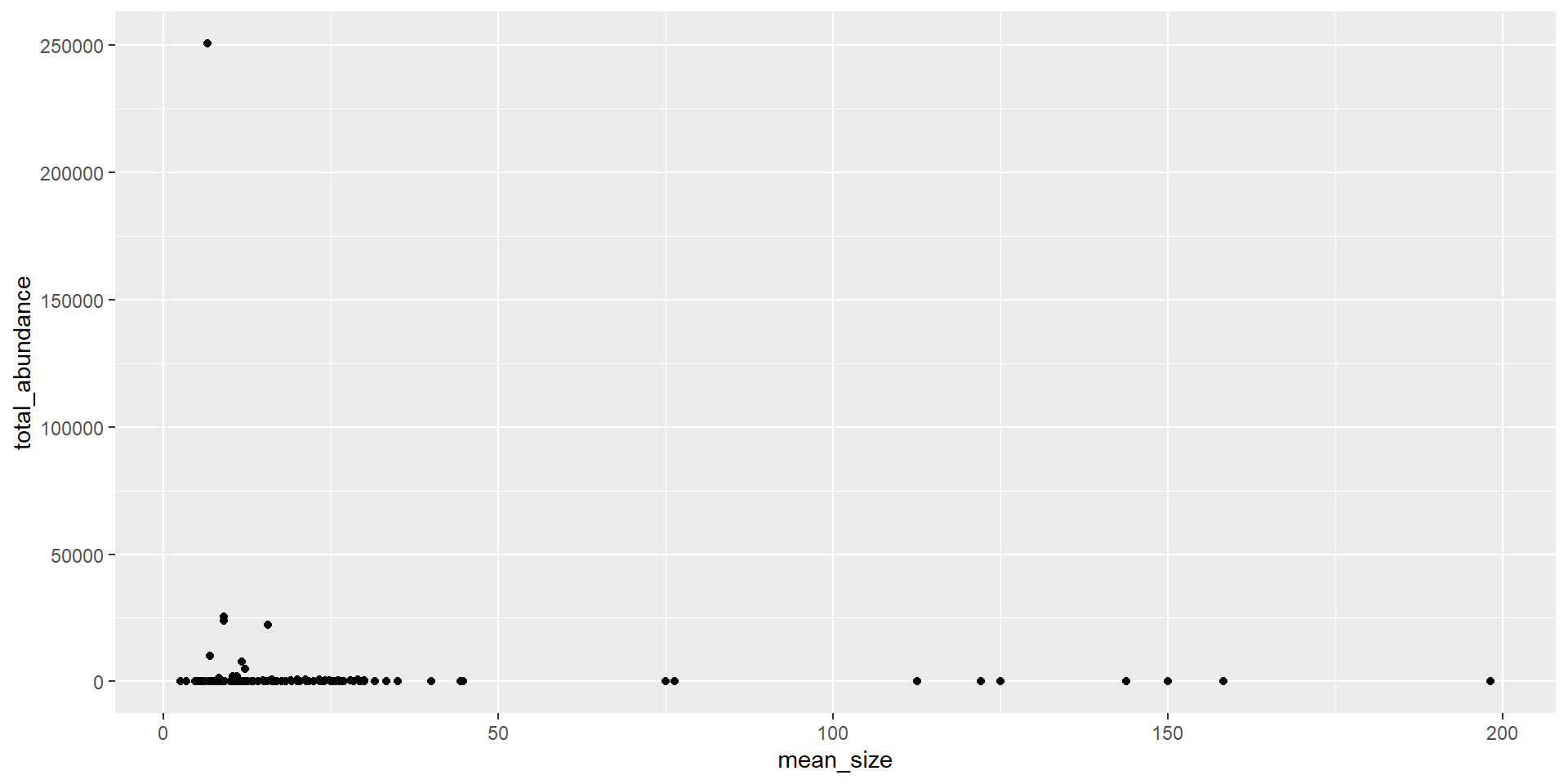
Mean size vs. total abundance

sizes_byspp %>%
  ggplot(aes(x = mean_size, y = total_abundance)) +
  geom_point()
# Its not clean, potentially just one outlier
# Would transformation of the data make it more obvious to visualise?

Transforming data

# Two ways transform data

# transform before input into the ggplot
sizes_byspp %>%
  mutate(log_tot_abun = log(total_abundance)) %>%
  ggplot(aes(x = mean_size, y = log_tot_abun)) +
  geom_point()

# perform the transformation in the ggplot
sizes_byspp %>%
  ggplot(aes(x = mean_size, y = total_abundance)) +
  geom_point() +
  scale_y_log10()

# what are the two differences between these two? (think: visual and data)

Dealing with overalapping points

# Changing the transparency of the point (= alpha)
sizes_byspp %>%
  ggplot(aes(x = mean_size, y = total_abundance)) +
  geom_point(alpha = 0.5) + # alpha argument changes transparency
  scale_y_log10()

# Changing the type of point (= pch)
sizes_byspp %>%
  ggplot(aes(x = mean_size, y = total_abundance)) +
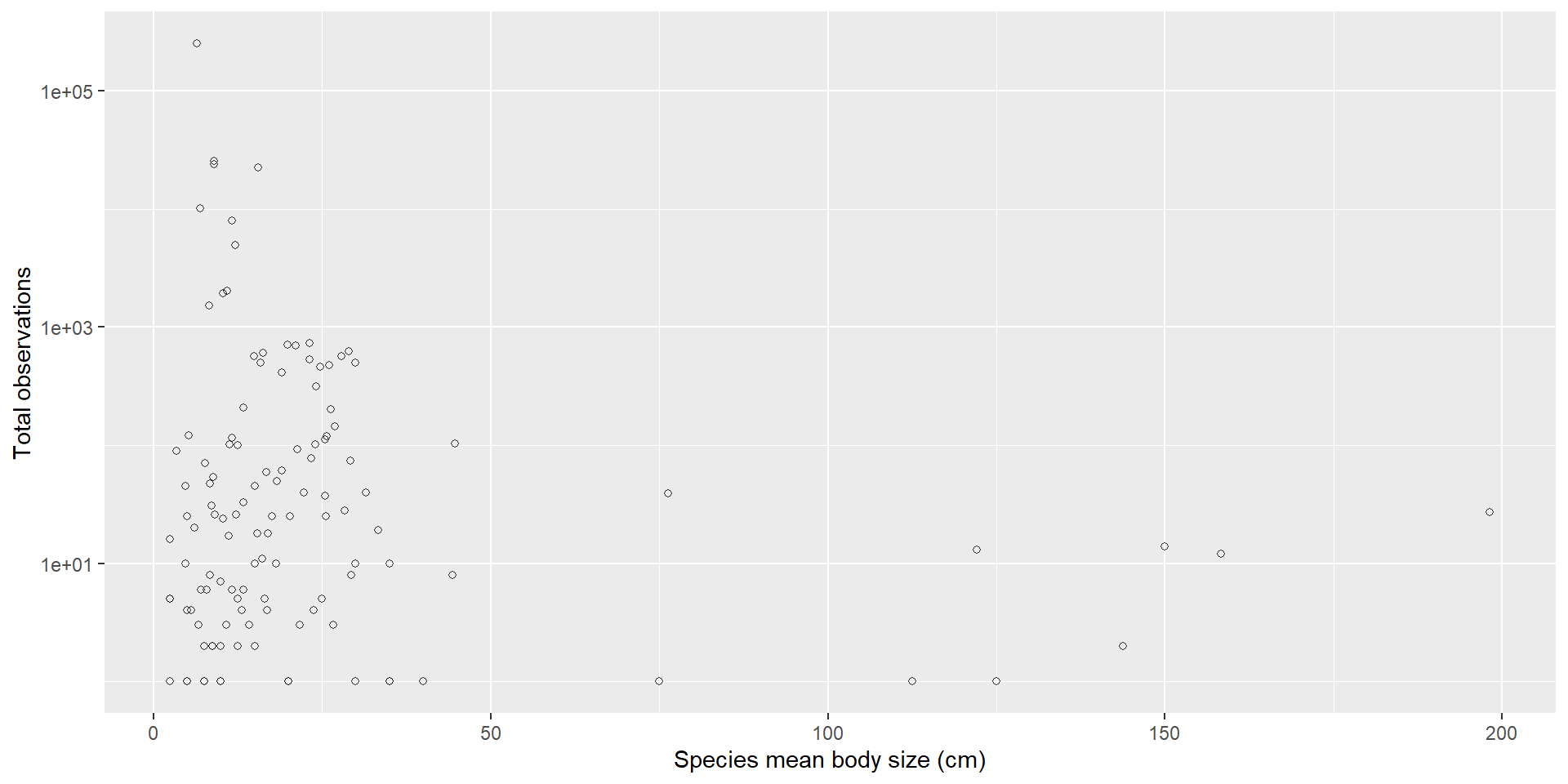
  geom_point(pch = 21) + # pch argument changes point type (Google: "pch in r")
  scale_y_log10()

Task

  1. Change alpha to various values
  2. Change pch to get a hollow square

A cleaner plot

sizes_byspp %>%
  ggplot(aes(x = mean_size, y = total_abundance)) +
  geom_point(pch = 21, alpha = 0.8) +
  scale_y_log10() +
  labs(x = "Species mean body size (cm)", y = "Total observations")
# Would it be worth doing more stats?

One numerical, one categorical

  • Hypothesis 2: More species are seen in Method 1, than Method 2 (inverts + cryptic species)
  • What columns do I need? What the classes of these columns?
  • What would be suitable plots for these data?

Wrangling before plotting

# number of species at each survey within a site for each method
nspp_bysurv_bysite <-
  capehowe %>%
  select(survey_date, species_name, site_code, method) %>%
  distinct() %>%
  count(survey_date, site_code, method) |> 
  rename(n_species = n)

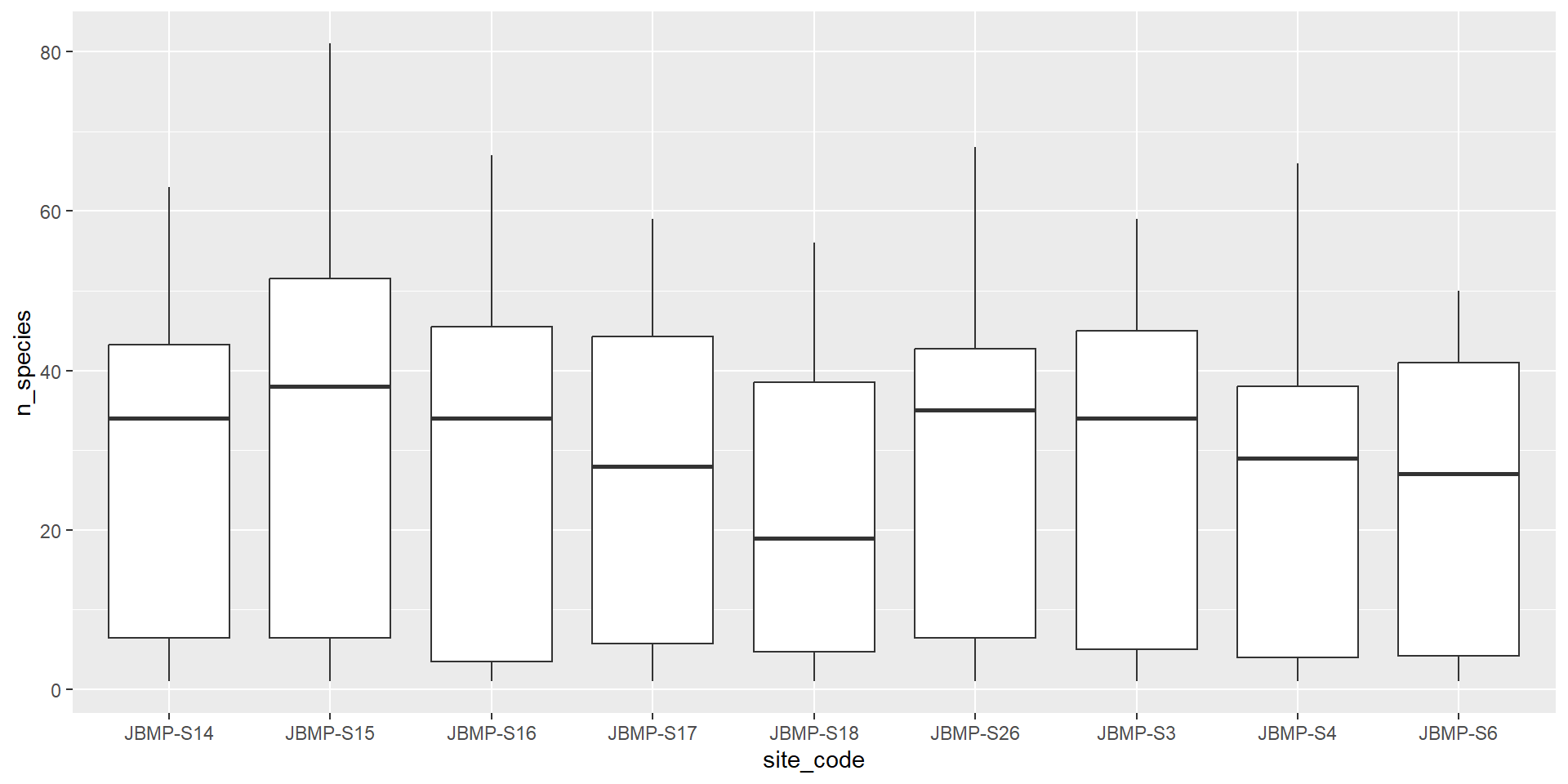
Boxplot (Categorical vs numeric)

selected_sites <- c("JBMP-S15", "JBMP-S16","JBMP-S26","JBMP-S17", "JBMP-S3" , "JBMP-S18", "JBMP-S4",  "JBMP-S6",  "JBMP-S14")

nspp_bysurv_bysite %>%
  filter(site_code %in% selected_sites) %>%
  ggplot() +
  aes(x = site_code, y = n_species) + # why do we need as.factor() here?
  geom_boxplot()

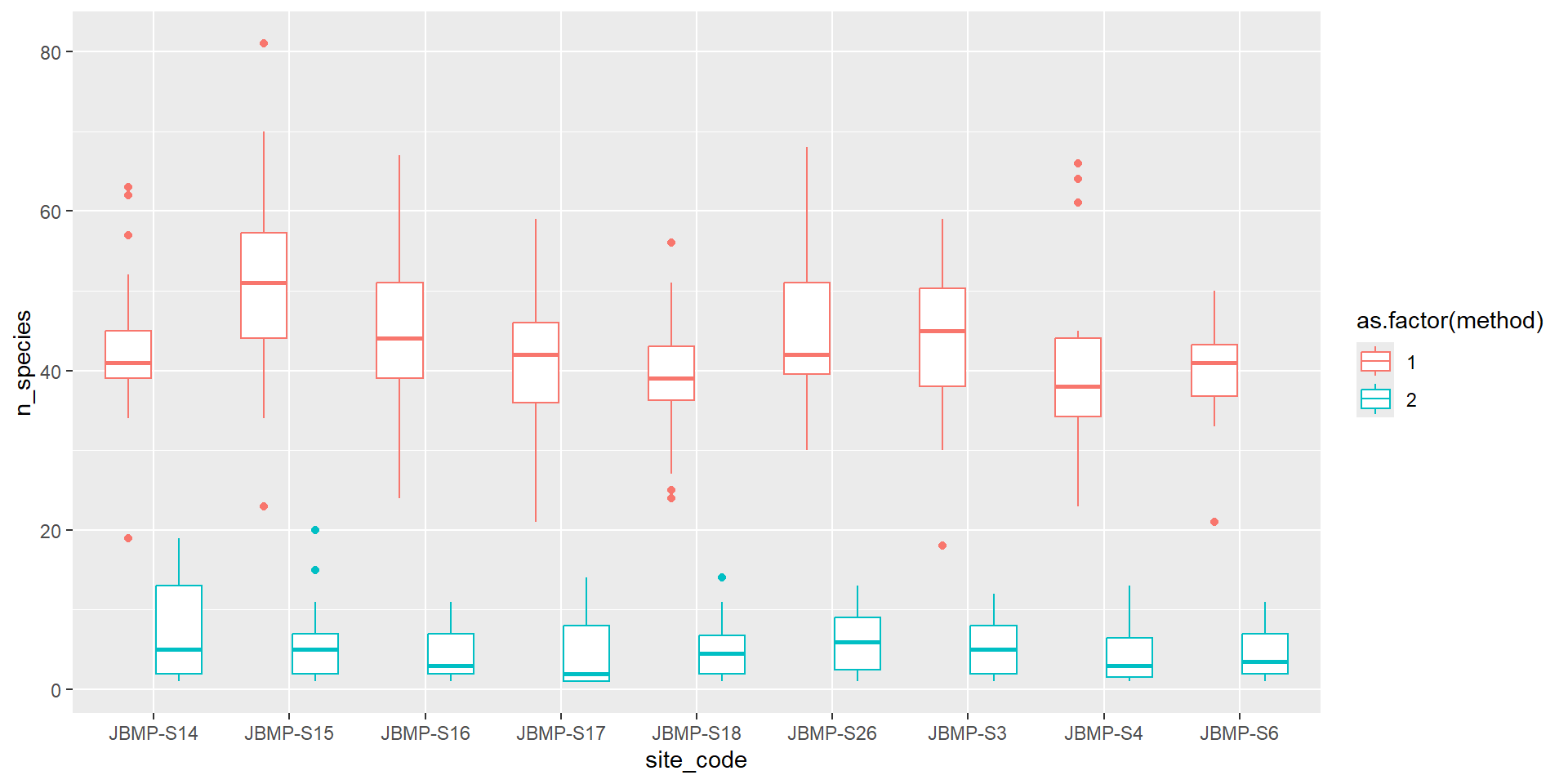
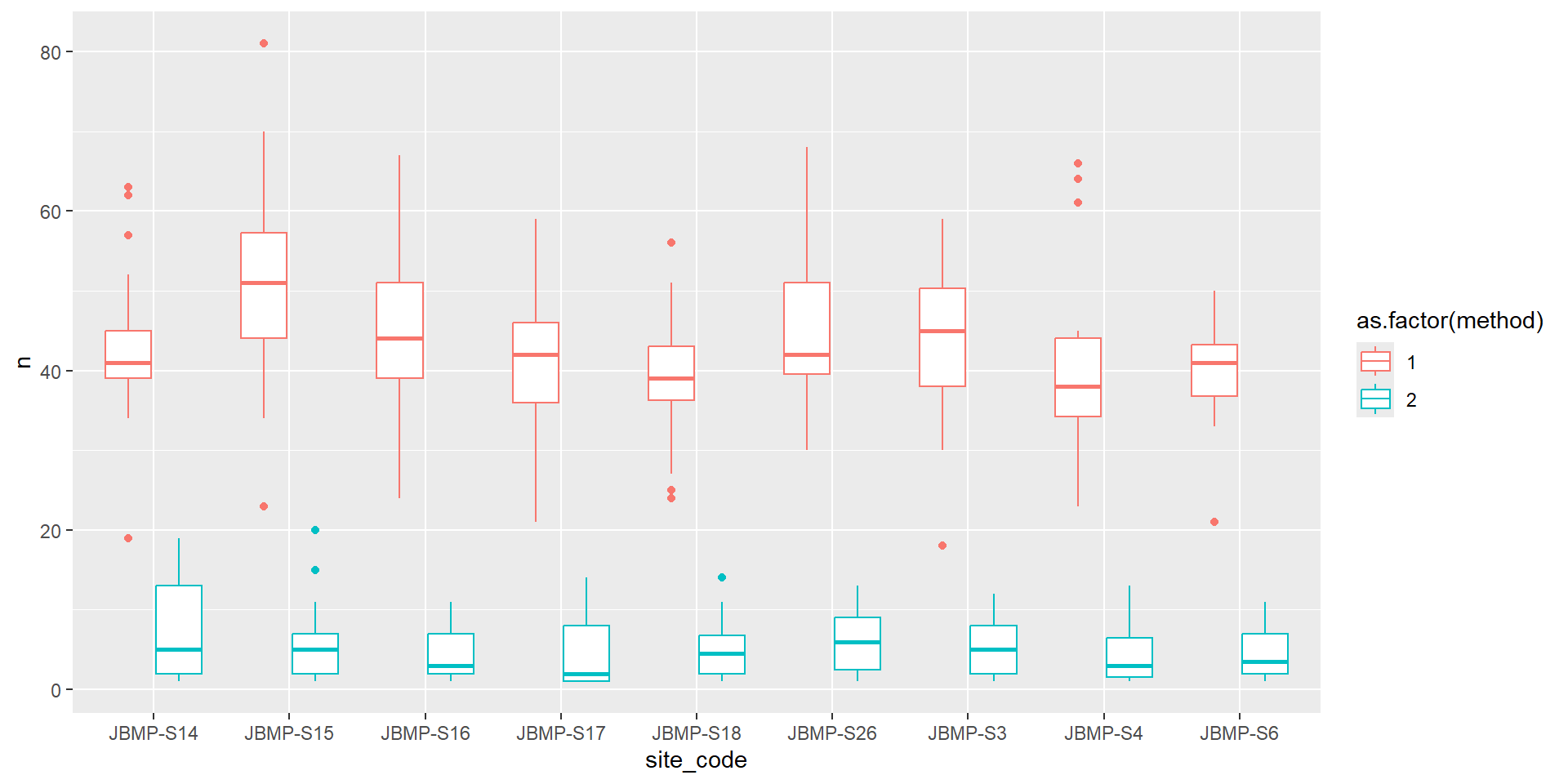
Boxplot coloured by method

# separate by the method
nspp_bysurv_bysite %>%
  filter(site_code %in% selected_sites) %>%
  ggplot() +
  aes(x = site_code, y = n_species, col = as.factor(method)) + # why do we need as.factor() here?
  geom_boxplot()

Violin plots (Categorical vs numeric)
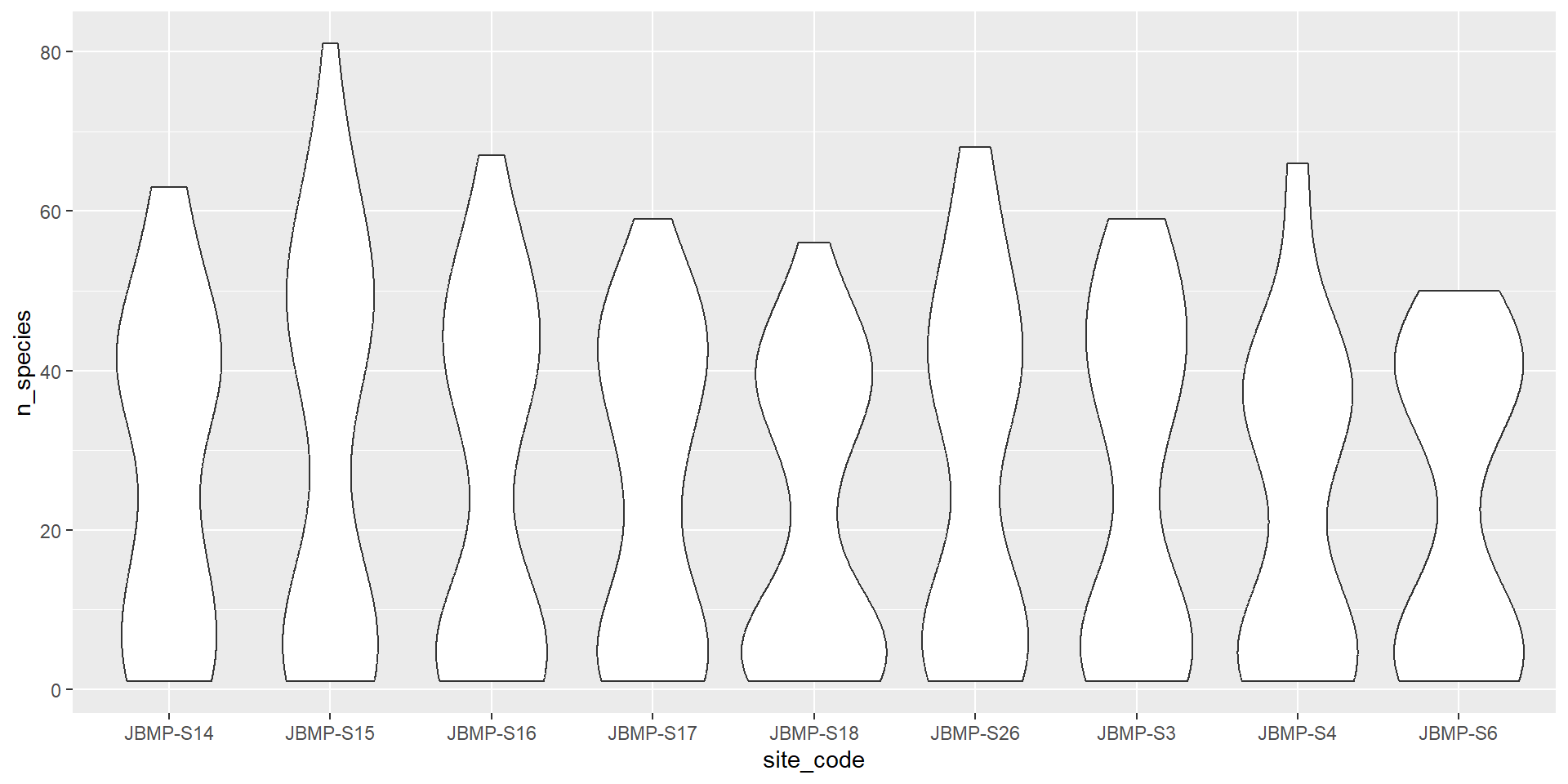
nspp_bysurv_bysite %>%
  filter(site_code %in% selected_sites) %>%
  ggplot() +
  aes(x = site_code, y = n_species) +
  geom_violin() # how does this differ from a boxplot?
# Try and also separate the method by colour

Barplots (Categorical vs numeric)

# For a barplot you might want the bar to represent the mean or median.
# how do barplots differ from violin or boxplots?
nspp_bysurv_bysite %>%
  filter(site_code %in% selected_sites) %>%
  summarise(
    mean_diversity = mean(n_species, na.rm = TRUE),
    .by = c(site_code, method)
  ) %>%
  ggplot() +
  aes(x = site_code, y = mean_diversity, fill = as.factor(method)) +
  geom_col(position = "dodge") +
  labs(fill = "Method", x = "Site Code", y = "Mean number of species")
# what happens if you remove: position = "dodge"?

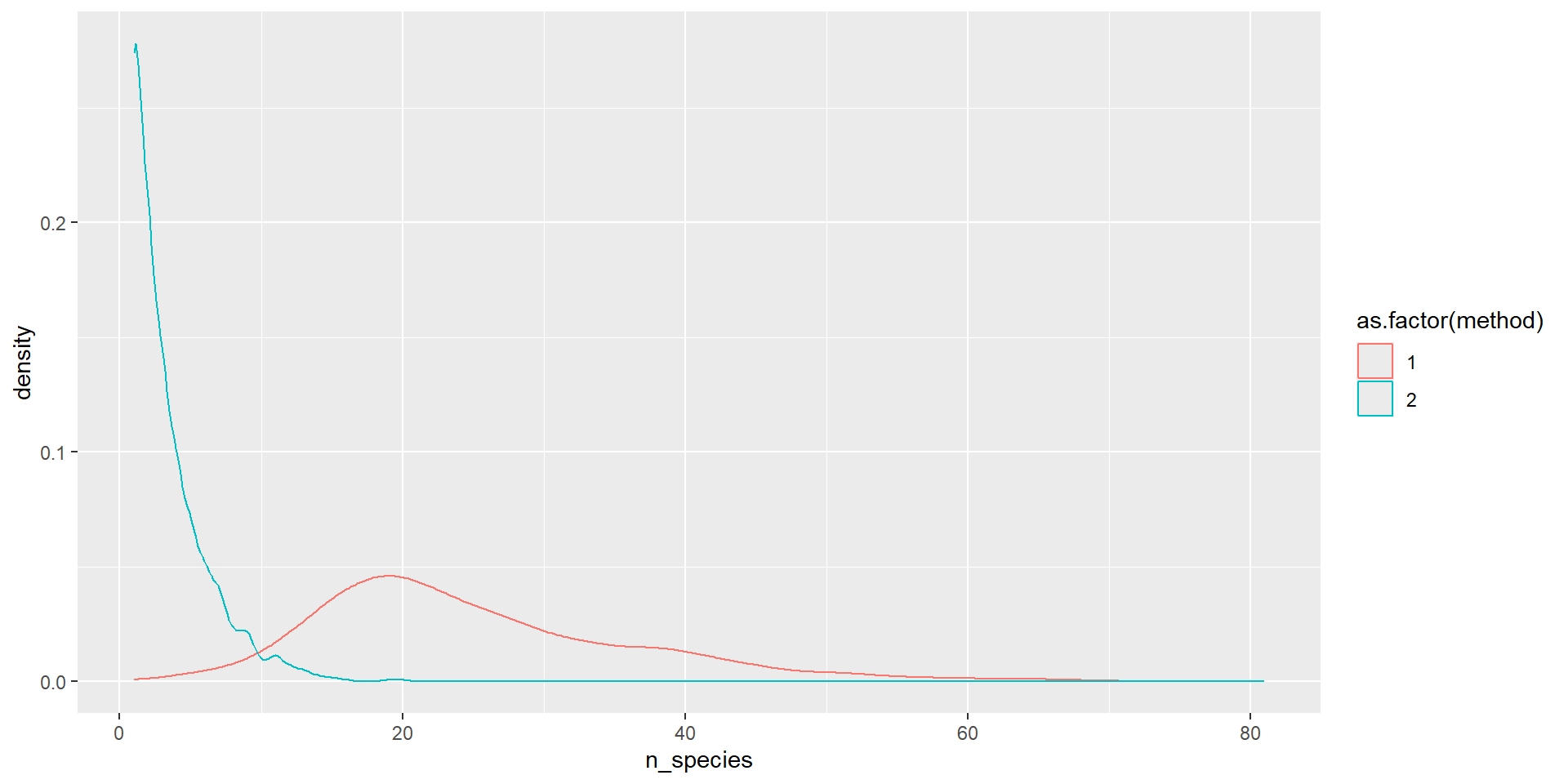
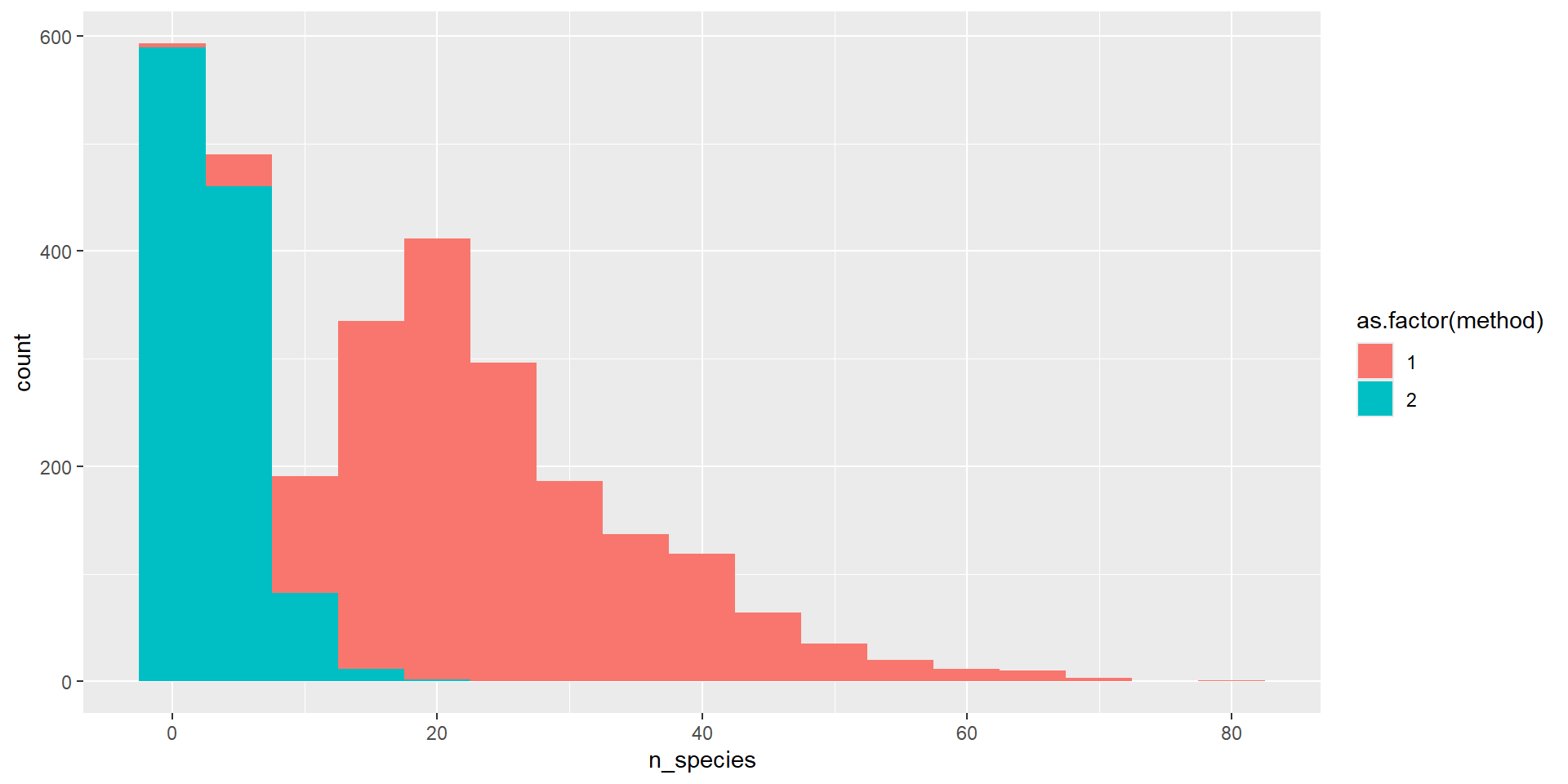
One numerical variable

nspp_bysurv_bysite %>%
  ggplot(aes(x = n_species, col = as.factor(method))) +
  geom_density()

nspp_bysurv_bysite %>%
  ggplot(aes(x = n_species, fill = as.factor(method))) +
  geom_histogram(binwidth = 5)

Extra - multiple plots

  • Sometime you want to split up plots by a factor
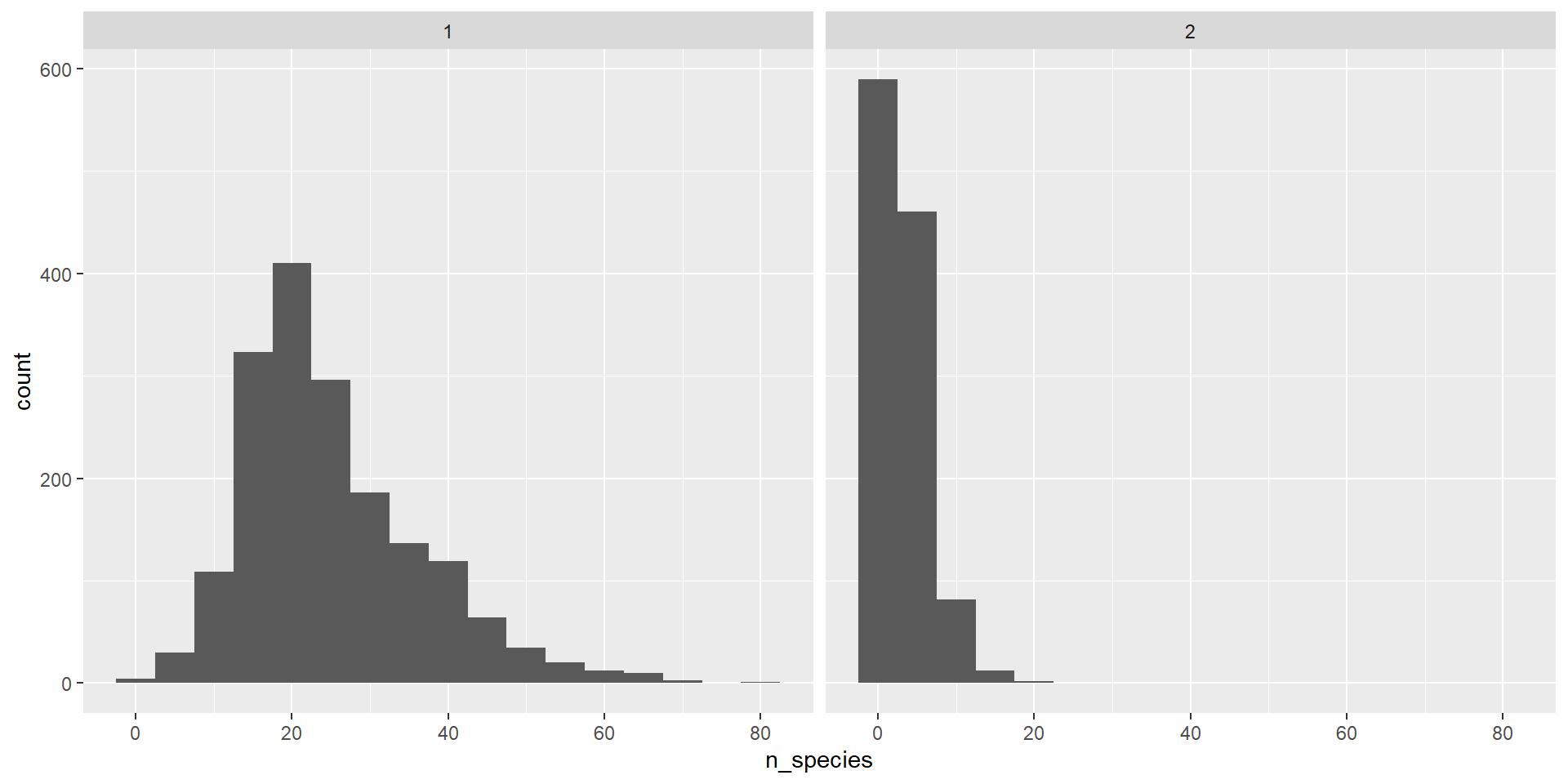
nspp_bysurv_bysite %>%
  ggplot() +
  aes(x = n_species) +
  geom_histogram(binwidth = 5) +
  facet_wrap(~method)

Extra - Error bars

# Barplots need error bars
nspp_bysurv_bysite %>%
  filter(site_code %in% selected_sites) %>%
  summarise(
    mean_diversity = mean(n_species, na.rm = TRUE),
    sd_diversity = sd(n_species, na.rm = TRUE),
    .by = c(site_code, method)
  ) %>%
  ggplot() +
  aes(x = site_code, y = mean_diversity, fill = as.factor(method)) +
  geom_col(position = position_dodge(width = 1)) +
  geom_errorbar(
    aes(
      ymin = mean_diversity - sd_diversity,
      ymax = mean_diversity + sd_diversity
    ),
    width = 0.2,
    position = position_dodge(width = 1)
  ) +
  labs(fill = "Method", x = "Site Code", y = "Mean number of species")

Extra - Theming

# Making pretty plots
nspp_bysurv_bysite %>%
  filter(site_code %in% selected_sites) %>%
  summarise(
    mean_diversity = mean(n_species, na.rm = TRUE),
    sd_diversity = sd(n_species, na.rm = TRUE),
    .by = c(site_code, method)
  ) %>%
  ggplot() +
  aes(x = site_code, y = mean_diversity, fill = as.factor(method)) +
  geom_col(position = position_dodge(width = 1)) +
  geom_errorbar(
    aes(
      ymin = mean_diversity - sd_diversity,
      ymax = mean_diversity + sd_diversity
    ),
    width = 0.2,
    position = position_dodge(width = 1)
  ) +
  labs(fill = "Method", x = "Site Code", y = "Mean number of species") +
  scale_fill_brewer(palette = "Set1") + #https://r-graph-gallery.com/38-rcolorbrewers-palettes.html
  theme_classic() # https://ggplot2.tidyverse.org/reference/ggtheme.html

Extra - Layering geoms

# Change the order of the geom_line() and geom_point()
nspp_bysurv_bysite %>%
  mutate(year = year(survey_date)) %>%
  summarise(mean_diversity = mean(n_species, na.rm = TRUE), .by = c(year, method)) %>%
  ggplot() +
  aes(x = year, y = mean_diversity) +
  geom_line(aes(group = as.factor(method))) +
  geom_point(aes(col = as.factor(method)), size = 5)

Cheatsheet

https://statsandr.com/blog/files/ggplot2-cheatsheet.pdf

Next week

  • Collating all that we have learned.
  • Please bring your own data if you have some.